The purpose of this article is to document my experiments with the Xiaomi Smart Home Hub 2 device. As its name suggests, this device is a proprietary smart home bridge for the Xiaomi smart home ecosystem. It supports the Bluetooth and Zigbee protocols to connect to smart home sensors. Newer revisions also support Matter. You might be thinking to yourself, "hey, this sounds like a great little device for my smart home needs!" But the issue is that once you try to do anything even remotely advanced, such as using the hub offline, without access to the internet it freaks out instantly and refuses to work properly.
The "problem"
We have a few "Mi Temperature and Humidity Monitor 2" sensors at home because my father bought them with the intention of flashing a custom firmware on them to free them from the proprietary Xiaomi cloud and Mi Home app to use them with Home Assistant locally. Unfortunately the ones he was able to purchase at the nearby hardware store came with the newer, patched firmware. His attempts at firmware flashing failed and only resulted in bricking the smart sensors. Having already bought multiple of the sensors, he ultimately chose to buy Xiaomi's Smart Home Hub 2.
This is where I come into the picture. I really dislike the concept of "dumb" hardware relying on the cloud just for status updates. I understand the business perspective, they have to make money somehow and limiting people to their products is an effective method of doing that. I am not even mad, because for most people these things being plug and play is great: setting them up is as simple as downloading an app, signing in and pairing the device. Boom, it works and that's what matters for non-tech-savvy users. However, I consider myself tech-savvy enough to configure a smart home appliance. This is why I put the word "problem" in the heading of this section between quotes: because I think this is a "me problem" rather than a manufacturer being "bad".
Preliminary tests
Before resorting to anything drastic, I wanted to poke around the unchanged software. I first set up the Xiaomi Home addon from the Home Assistant integrations list. While walking through the set up wizard for the integration, it asked me for an online host it can ping to check if it is offline, because if it is, it will fall back to local only communication. A lightbulb immediately turned on above my head: set it to a random IP address, like 1.1.1.1 or 8.8.8.8, finish the set up process and then just simply block requests to that address with UFW.
So I did those, and also looked through the addon's source code and blocked the domains I saw there to be extra sure. Then, I blocked the hub's internet access in my router's settings. Aaand, nothing. The hub just flashes its blue indicator light, while the addon stops communicating with it. Great. Or rather not.
Attempting to localize the firmware for offline use
After my basic idea failed, I found AlexxIT's Xiaomi Gateway 3 project on GitHub. It seemed like a great solution for what I set out to do. So I set it up, extracted the token and keys, it worked. Even offline. Sure, the hub's indicator light was blinking just as before, but it worked. Local only communication, baby!
I then sent a reboot command via the integration and the device bricked itself. I have no idea how or why, it just did. Every time I plugged the device in, the blue light came on and nothing else happened. It wouldn't even connect to the router. I tried to set up an ethernet link between it and my Fedora desktop, and even my MacBook but to no avail (because it was configured to use ethernet instead of Wi-Fi).
We bought a replacement and that was it. It is running via the official Xiaomi integration, with cloud. The project failed.
Giving the hub a new life
The hub is a very capable piece of hardware. The model number of mine is: ZNDMWG04LM.
 Image courtesy of Xiaomi.
- It has 10 / 100 Mbps ethernet.
- 128 MB of DDR3 memory.
- A dual core ARM based SigmaStar SSD222D CPU with 1 GHz clock speed.
- It uses a plain USB-C connector for power and only requires 5 V / 1 A.
- Various radio protocols:
- 2,4 GHz Wi-Fi
- 5 GHZ Wi-Fi
- Zigbee 3.0 (EFR32MG21 chip, MHCZ01P-IB model)
- Bluetooth 5.0 (with BLE support)
- Matter (on newer revisions, starting 2025)
I figured, since it is already broken software-wise, and a replacement is already in place, I might aswell try to turn it into a small linux embedded device, like a Raspberry Pi or similar. Sure, those are more powerful, and I don't even have a specific use-case for now, but it could be fun project.
My new goal became to put a lightweight Linux distribution on this thing that is free from any proprietary components. Linux can run on a half exploded toaster and still recognize every button, every hardware component so I figured it could also do the same with the various radio protocols this device has.
UART
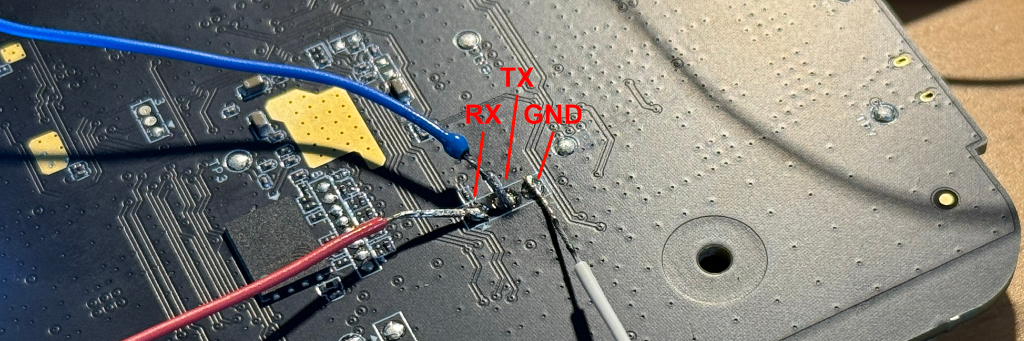
I am not a hardware guy. I like tinkering with software, but I never really cared enough to start toying around with hardware. So I had to do some research about this thing called Universal Asynchronous Receiver-Transmitter, or UART for short. For those who don't know, this is a standardized way to communicate with embedded devices. It consists of 4 pins on the motherboard, though in some cases there may only be 3. The first pin is the ground (GND), the second the transmitter (TX), the third is the receiver (RX), and finally and optionally you have the power (VCC) pin. These pins allow us to read the standard output of the device and write to it. This is basically a serial port.
The only caveat with UART is that you need some way to read and send these signals on your main machine. Most people recommend getting a USB board, but I do not have one. What I have instead is a Raspberry Pi Zero W. I bought the Pi a few months ago for a different experiment but it came handy now too (note: I have read that you can also use an Arduino or any other similar device with GPIO pins).
I identified the 3 UART pins on the motherboard. I am not sure if this motherboard even has a VCC pin. Based on the Xiaomi Gateway 3 project's wiki, it likely has one but it is not needed because USB power is sufficient (I am basing this on the prior generation's reverse engineering uploaded there).